Check before you pay, click, or trust.
ScamShield NG helps people assess suspicious messages, screenshots, payment proofs, job offers, vendor chats, rent requests, and links before they send money or share sensitive information.
Clear scam-risk guidance powered by OCR, rule-based warning signs, and AI-assisted analysis.
Guidance — not legal proof or guaranteed fraud verification.
Functional private beta. Core mobile and admin workflows are operational. Final quality assurance, security hardening, and pilot preparation are ongoing.
Nigeria is the launch market. The platform is designed for future localization across other mobile-first markets.
Scams often look like ordinary digital conversations.
The hardest scams are not always obvious. They arrive through familiar platforms, trusted-looking screenshots, urgent messages, and everyday transactions.
ScamShield NG does not blame victims. Scams can happen to anyone. The goal is to help people slow down and recognize warning signs before they act.
The product: A mobile digital-safety assistant that checks suspicious messages, screenshots, and links for visible warning signs. Initial customers: Nigerian consumers facing job-offer scams, fake payment proofs, fraudulent vendors, and rent scams. Current stage: Functional private beta preparing for pilot.
What you can check today
Three primary ways to assess risk, plus supporting tools for safer decisions.
Check suspicious text
Paste a message or conversation and receive a cautious risk assessment with visible warning signs and safer next steps.
Check a screenshot
Upload a screenshot, review extracted text, and understand the warning signs without publicly exposing the conversation.
Check a link
Inspect visible URL characteristics such as shortened links, unusual domains, and suspicious structures without opening the website.
Also included
ScamShield NG does not imply external verification when it was not performed. All assessments are based on visible content and pattern analysis.
How it works
Three steps from suspicion to safer decision.
Submit what looks suspicious
Paste text, upload a screenshot, or enter a link.
Understand visible warning signs
ScamShield NG combines OCR, deterministic checks, and AI-assisted context analysis.
Take a safer next step
Review practical guidance, verify through official channels, save the result, or privately report the pattern.
ScamShield NG does not contact the sender, verify criminal conduct, or replace banks, regulators, law enforcement, or legal professionals.
Who it helps
Realistic decision moments where a quick check can prevent loss.
Job seekers
Assess recruitment messages and job offers for upfront fees, unrealistic salaries, and unverified recruiters.
Online shoppers
Check vendor conversations and payment requests before transferring money to an unknown seller.
Small sellers and freelancers
Review payment proofs and customer messages for fake alerts and suspicious transaction patterns.
Renters and house seekers
Evaluate rent requests and property agent messages before paying deposits or sharing personal details.
Families and caregivers
Help loved ones recognize suspicious messages, giveaway scams, and urgent requests for money or information.
Everyday smartphone users
A practical safety tool for anyone who receives messages, links, or payment requests on their phone.
See it in action
A look at the ScamShield NG product experience.
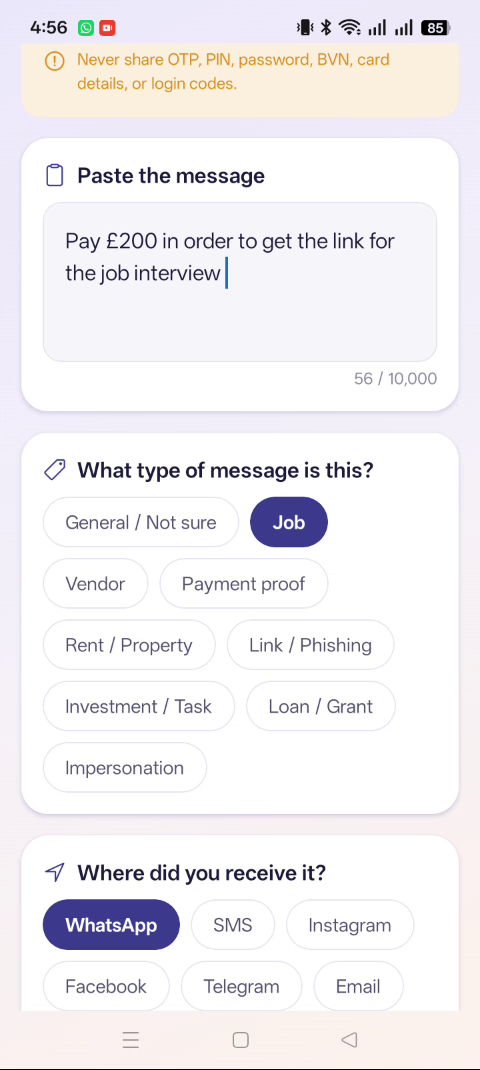
Mobile checking
Paste a suspicious message and select the message type to begin analysis.
Screenshots use demo data. No real user information is shown.
Built to guide — not accuse.
Privacy and safety are foundational to how ScamShield NG works.
Private by default
Scans and reports are designed to remain private.
User-controlled evidence retention
Users control whether evidence is kept or deleted after analysis.
Personal information masking
Sensitive personal details are masked in analysis outputs.
Cautious risk language
All guidance uses careful, non-accusatory wording.
No public scammer list
ScamShield NG does not publish a public scammer database.
Admin-reviewed private reports
Reports are reviewed by authorized admins only — never exposed publicly.
ScamShield NG explains visible warning signs. It does not declare people or businesses fraudulent.
A functional product preparing for pilot.
Functional private beta. Core mobile and admin workflows are operational. Final quality assurance, security hardening, and pilot preparation are ongoing.
ScamShield NG is currently a functional private-beta product preparing for limited pilot testing.
Starting with consumers. Growing into trust infrastructure.
ScamShield NG is launching as a consumer digital-safety assistant for Nigeria. Over time, the platform is designed to support risk-screening tools and operational intelligence for fintechs, marketplaces, job platforms, property platforms, schools, and SMEs.
Nigeria is the launch market. The platform is designed for future localization across other mobile-first markets.
Planned APIs and integrations are not live. Future capabilities are design-direction only.
Help build safer digital transactions.
We are open to conversations with organizations that share our mission.
Fintechs and banks
Risk-screening tools and transaction safety intelligence.
Job platforms
Detect fraudulent recruitment patterns and protect users.
Marketplaces
Vendor risk signals and buyer protection guidance.
Property platforms
Agent verification support and rent scam prevention.
Schools and NGOs
Digital-safety education and awareness programmes.
Consumer-protection organizations
Digital-literacy tools and scam-pattern intelligence sharing.
Built in Nigeria for mobile-first digital life.

Ezra Lambe
Full-stack product engineer
Ezra Lambe is a full-stack product engineer building ScamShield NG. He works across mobile applications, cloud backends, and AI-assisted systems with a focus on privacy-conscious product design. His experience spans the full product lifecycle — from prototype to production — with deep understanding of Nigeria’s mobile-first digital landscape and the trust gaps that affect emerging-market consumers.
Watch the product demo
See how ScamShield NG helps users check suspicious content before they act.
Read the demo transcript
Title: ScamShield NG — Product Demo
Duration: ~77 seconds (silent, on-screen captions)
- Home: The ScamShield NG mobile home screen with greeting and quick action buttons for checking text, screenshots, and links.
- Check a screenshot: A suspicious screenshot is uploaded for analysis.
- OCR review: Extracted text is displayed for user review and correction before analysis.
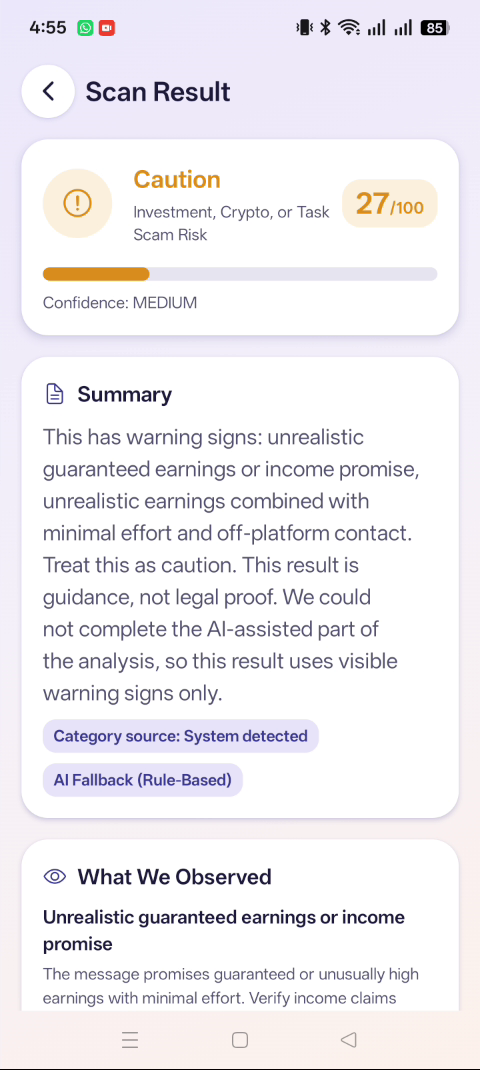
- Risk result: The scan result shows a caution risk level with visible warning signs and safer next steps.
- Check suspicious text: A demo job-offer message is pasted and analysed.
- Text risk result: Warning signs are highlighted with cautious, non-accusatory language.
- Private report: The private reporting form with category selection.
- Admin analytics: The admin dashboard showing aggregate analytics overview.
- Admin monitoring: The operational monitoring table for private report review.
- Admin safety education: The safety education administration view.
All screenshots and demo data are sanitized. No real user information is shown.
Screenshots use demo data. No real user information is shown. ScamShield NG is not publicly downloadable.
Frequently asked questions
No. It identifies visible warning signs and provides safety guidance. It does not provide legal proof or official fraud verification.
Make the next digital decision with more clarity.
Get in touch
Join the private beta, discuss a partnership, or learn more about ScamShield NG.
Prefer email? Reach us at scamshield@asholae.com